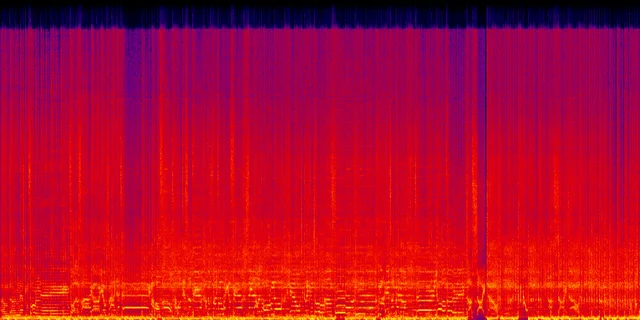
Before
Glassy top end, splashy highs, and that familiar AI texture.
Suno Artifact Remover
Clean the metallic shimmer, robotic vocals, harsh highs, hiss, and digital noise that show up in Suno, Udio, and other AI music exports.
Upload a track, pick the problem you hear, and reserve a future $2 cleanup spot with your email.
Reserve a future cleanup slot in under a minute.
Suno Artifact Remover for Release-Ready AI Music
Sometimes the song is good and the export is not. The demo should make that obvious: raw AI audio first, then the cleaner version.
Before
Glassy top end, splashy highs, and that familiar AI texture.
After
Smoother highs, cleaner vocals, and a track that is easier to listen to.
Suno can get the hook right. It can get the chorus, the mood, even the arrangement. Then you export the track and hear the problem: a metallic layer over the mix, a vocal that feels plastic, cymbals that bite too hard, or a muddy master that does not hold up next to normal releases.
That glassy high-frequency layer sitting on top of the mix.
Plastic edges, hard sibilance, and wobble on held notes.
Piercing hats, brittle upper mids, and headphone fatigue.
Weak low end, smeared reverb, and a track that feels unfinished.
One Suno track might need vocal cleanup. Another might need less shimmer. Start with the thing that bothers you most.
Reduces metallic shimmer, hiss, warble, gating, and the digital grit common in AI music.
Takes the hard edge off AI vocals: sibilance, wobble, and that plastic tone on sustained lines.
Softens brittle upper mids, piercing highs, and splashy hats that make the track tiring.
Adds loudness and balance after cleanup, so the track feels closer to a finished export.
Cleanup first. Mastering second.
Sunofix is designed as an automatic cleanup pass for generated music. It looks for problems common in Suno and Udio exports: metallic shimmer, unstable highs, vocal plasticity, harsh sibilance, smeared ambience, and the thin digital edge that makes a good song feel unfinished.
The intended workflow is simple: upload the track, choose the main audio problem, and reserve the cleanup. Sunofix is being shaped as an online processing flow, not a manual studio quote or a long engineering brief.
The target experience is minutes, not days. A normal track should move through analysis, cleanup, and before-and-after preview as one online job. Very rough files may need more care if the source is clipped, muddy, or heavily reverbed.
Cleanup works best when the song is already good and the artifact sits on top of it. Sunofix can reduce shimmer, harshness, and robotic texture, but it should not promise to fix bad lyrics, a broken melody, or a fully distorted source.
EQ changes broad frequency bands. Denoise tools remove steady background noise. Mastering makes a track louder and more balanced. Sunofix focuses on AI-specific texture problems, so the goal is to remove the synthetic edge without dulling the whole mix.
Upload, choose the fix, and reserve one future cleanup for $2.
Mastering can make a track louder. It cannot magically remove the metallic layer baked into a rough AI export. If the source has shimmer, hiss, or robotic vocals, a standard mastering chain can push those flaws forward.
Clean the source first. Master the cleaner version.
Suno is the starting point because Suno creators already search for this problem by name: artifacts, metallic sound, shimmer, bad vocals, rough exports. Sunofix is narrower than a general audio editor. It is built around the failure modes of AI music generators, then extended to Udio and other tools with similar artifacts.
$2 per track
No subscription just to fix one song. One track, one cleanup, one simple price.
Reserve one future AI cleanup for the track you want to fix.
The point is to keep the melody, lyrics, and arrangement intact while cleaning up the artifacts that make the audio feel synthetic. Sunofix is for creators who like the song but hate the export quality.
Short answers to the questions Suno creators ask when a track has the right idea but the wrong sound.
Metallic shimmer in Suno usually comes from unstable high-frequency content created during generation. The song may have a good melody, but the export can add glassy overtones, splashy cymbals, hiss, and spectral smearing around vocals or reverb tails. The fix is not simply cutting treble; the artifact needs targeted cleanup so the mix keeps its clarity.
AI vocals can often sound more human when the harsh edges are reduced. The biggest tells are robotic sibilance, plastic tone, pitch wobble, gated breaths, and reverb that sticks to the voice. Cleanup should smooth those artifacts while keeping the original performance, phrasing, lyrics, and emotion intact.
To make a Suno song closer to Spotify-ready, clean the source before mastering it. Remove metallic shimmer, harsh highs, vocal artifacts, and muddy ambience first, then apply loudness and tonal balance. Distribution still depends on rights, platform rules, and the original song quality, but cleanup gives the master a better source to work with.
Sunofix is designed as an automatic online cleanup flow. You choose the main problem you hear, such as metallic shimmer or robotic vocals, and the processing path is matched to that problem.
The target is a minute-scale online workflow for normal tracks: analyze the file, run the selected cleanup, and prepare a before-and-after preview. Very damaged, clipped, or muddy files can be less predictable.
EQ, denoise, and mastering are useful, but they solve different problems. Sunofix is focused on AI-generated music artifacts: metallic shimmer, robotic vocals, harsh highs, warble, and smeared ambience.
Start by cleaning the source, not by making it louder. A Suno artifact remover should reduce metallic shimmer, harsh upper mids, hiss, and spectral smoothing before the track goes through mastering.
They can usually be improved. The common fixes are reducing hard sibilance, digital wobble, high-frequency shimmer, and messy vocal reverb. The vocal should still sound like the same performance, just less plastic.
No. Artifact removal deals with source problems: hiss, warble, metallic tails, robotic vocals, and harsh AI texture. Mastering deals with loudness, tone, stereo image, and final balance.
Sunofix is being built for Suno first, with Udio and other AI music generators next. The exact artifacts differ by tool, but the listener problem is similar: the song is there, and the audio still sounds synthetic.
The goal is to keep the composition, melody, lyrics, and arrangement intact while reducing the AI artifacts in the audio.
Sunofix can help make a Suno track cleaner and closer to a finished master. Release approval still depends on your rights, your distributor's rules, and the quality of the original track.
Upload a track, choose the cleanup mode that matches the problem you hear, and enter your email to reserve a future $2 processing spot.
Upload your Suno or Udio track, pick the cleanup mode, and reserve a $2 beta processing spot.
Clean my track - $2Reserve a future cleanup spot for one track.